


Whova - Event & Conference App
4.94.29K Reviews
App Specs
- Version
- 12.5.0
- Updated On
- License
- Free
- Downloads
- 1,000,000+
- Developer
- Whova
- Categories
- Business
- Platform
- Android, iOS
Screenshots
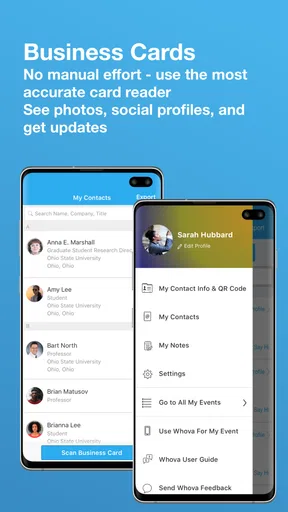
 Analysis by AppCompare
What I find most useful about Whova is how it brings an event’s schedule and attendee activity into one place. That changes the experience in a practical way: instead of treating a conference as a printed timetable plus a string of chance conversations, I can use the app to decide where to go and how to make contact. It works best when the event itself is using Whova actively; the app is a companion to a particular gathering, not a general-purpose directory of conferences.
Start with the event, not the app
Before relying on it, I’d check that the event I’m attending is available in the app and make sure I have the right event selected. Whova is made for event organizers to support their gatherings, so what appears in the app depends on the event’s setup. Once I’m in the correct space, the schedule and attendee features become useful together: I can plan sessions, then use the event’s social tools to follow up with people or find a conversation around a shared topic.
That distinction matters if you’re deciding whether it can replace every tool you use at work. It cannot take the place of a calendar, a video meeting app, or a broad professional network in every situation. Its value is more focused: it organizes participation while I’m attending an event that uses it. For a one-off appointment or a meeting arranged outside that setting, my usual calendar and messaging tools are simpler.
A practical way to plan a busy day
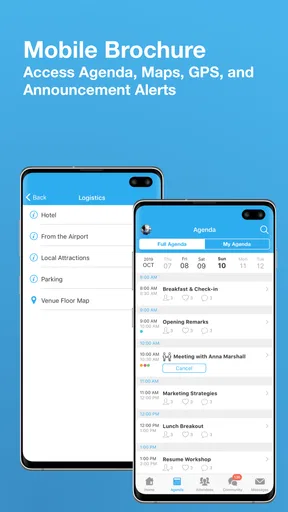
For a packed conference, I’d scan the schedule before arriving and pick the sessions I most want to attend. Then I’d leave some space rather than filling every gap. That buffer is useful because a good conversation may run long, a room may be across the venue, or I may decide that an informal discussion is more valuable than another talk. A personalized agenda helps me make those choices without constantly returning to a printed program.
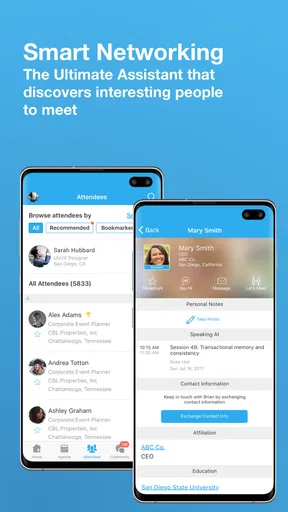
I’d also use the networking tools with a clear purpose. Instead of messaging a long list of attendees just because they are available, I’d look for people connected to a topic I care about and send a short note suggesting a specific conversation. If a meeting is arranged, I’d keep the time and place clear in the message, then make a brief reminder in my own calendar if I need one. This small habit prevents the app’s event conversations from becoming a pile of details I have to reconstruct later.
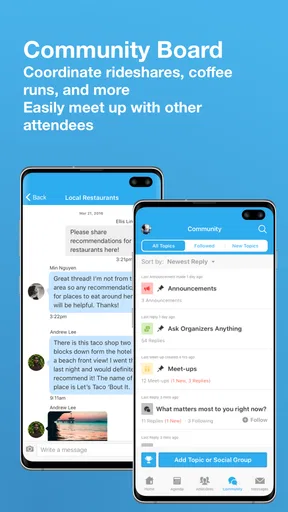
The Community Board can be especially handy for practical coordination. A request for a meal companion or shared ride is more useful when it includes a time and a clear plan, rather than a vague post that leaves others guessing. I’d avoid sharing personal details publicly and move sensitive arrangements to a suitable private channel. Used thoughtfully, the board makes it easier to find people with the same immediate need without turning every interaction into formal networking.
Where it fits among event tools
Compared with a paper program, Whova makes it easier to adjust a personal schedule and pair session planning with attendee interaction. Compared with a generic calendar, it gives the event context around the sessions and community. A professional social network may be better for contacts I want to keep in touch with over months or years, while ordinary messaging is often better once I already know someone and simply need to coordinate.
Worth Reading Before You Choose

EA SPORTS FC Mobile 26 Is a Bigger Football Game, but It Takes Time

Flipboard Shows What News Apps Must Do Beyond the Feed

Switching to Android Auto Means Rethinking Your Driving Routine

Google Calendar Makes a Crowded Week Easier to Manage

Ludo King Makes the Most of the Minutes Between Plans

Baby Panda World Brings Quick Play to Modern Phones, but Its Game Library Feels Busy
I wouldn’t treat those alternatives as competitors that must be discarded. I’d use Whova for the event-specific layer, my calendar for commitments that need to follow me elsewhere, and a regular messaging tool for ongoing conversations when that is more convenient. This division is particularly helpful after the event: I can preserve the contact details or notes I actually need instead of assuming that every conference interaction will remain easy to find in an event space later.
Who gets the most from it
The app is a strong fit for someone attending a conference with a full schedule who wants both structure and a low-pressure way to meet people. It can also help a first-time attendee who feels unsure about how to approach a room: a shared discussion or a practical board post can give the conversation a natural starting point. People who attend events only occasionally can still benefit, but they may need less of the networking side and should judge it by the particular event’s setup.
It is less compelling if I only need a basic schedule, dislike using social features, or am attending a gathering where the organizers have not made much use of the app. In those cases, a simple calendar entry or the event’s own printed information may be enough. The app does not remove the need to check venue details or make sensible plans, and I would not assume every attendee will respond quickly to a message. A little preparation and realistic expectations make a noticeable difference.
Alright, folks, let's dive into the world of Whova, the app that's turning heads in the event and conference space. Ever been to an event and felt a bit lost, or worse, like you missed out on some key networking opportunities? Yeah, me too. That's where Whova comes in to save the day, or the conference, I should say.
Getting Started with Whova
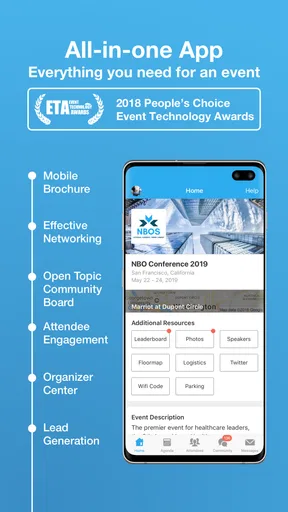
First things first, downloading and setting up Whova is a breeze. Available on both Android and iOS, you can snag it from your favorite app store. Once installed, you'll immediately notice its sleek and intuitive interface. It's like the app whispers, "Relax, I've got this." Signing up is straightforward, and before you know it, you're ready to dive into the heart of your event.
Features That Stand Out
Whova is packed with features that make attending events not only more efficient but actually fun. Let's start with the agenda. The app provides a detailed schedule of events, and what's cool is that you can customize it based on your interests. No more shuffling through paper programs or missing a session you were excited about.
Next up, the networking capabilities. This is where Whova really shines. The app acts like a social butterfly, helping you connect with other attendees, speakers, and exhibitors. You can send messages, schedule meetups, or even chat in group discussions. It's like having your personal networking assistant, minus the awkward small talk.
And let's not forget the "Community Board," a feature that encourages interaction among attendees. Need a dinner buddy or want to share a cab? Just post it on the board. It's these small touches that make the experience feel personal and engaging.
Performance and Reliability
Now, let's talk performance. No one wants an app that crashes or lags during an important session. Thankfully, Whova runs smoothly, even with hundreds of users online. I've attended a few events using this app, and not once did I encounter a hiccup. The developers have clearly put in the effort to ensure a seamless experience.
Another aspect worth mentioning is its offline functionality. If you're in a venue with spotty Wi-Fi, no worries. You can still access your agenda and notes, which is a huge plus for those of us who aren't always blessed with perfect connectivity.
User Experience and Design
Let's face it, the design of an app can make or break the user experience. Fortunately, Whova nails it with a clean, modern layout that's both visually pleasing and easy to navigate. The app feels intuitive, with everything you need just a tap away. Whether you're a tech-savvy millennial or someone just getting the hang of smartphones, you'll find it user-friendly.
The color scheme is easy on the eyes, and the icons are self-explanatory, which means you won't find yourself fumbling around trying to figure out what does what. It's all about simplicity and efficiency, and Whova delivers on both fronts.
Why You Should Try Whova
So, why should you give Whova a shot? If you're someone who attends events regularly, this app is a game-changer. It enriches the entire experience, ensuring you get the most out of every event. From personalized agendas to powerful networking tools, it covers all bases.
Plus, there's something undeniably satisfying about having all your event information in one place. No more juggling apps or stray notes. It's all right there, neatly organized and ready whenever you are.
To wrap it up, Whova is more than just an app; it's your event companion, making sure you never miss a beat. Whether you're attending a small workshop or a massive conference, this app will keep you connected and informed every step of the way.
Who Whova suits—and where I’d draw the line
Whova is a free business app from developer Whova, and its long presence in the event-app space is reflected in a 4.9 average from around 31,000 ratings, with more than 1 million installs. It is rated Teen, launched in October 2013, and its current version is 12.1.0, requiring Android 7.0 or later. Those figures may reassure someone who wants an established app, but they don’t guarantee that a particular event will use every tool well. I’d judge the experience mainly by whether the organizer has populated the schedule and encouraged attendees to participate.
A useful everyday example is a two-day industry conference where several sessions overlap. On the first morning, I’d use the agenda to identify the talk I most want to catch, then note a second choice in case the room is full or the discussion changes my priorities. Between sessions, I could check the attendee community for a relevant conversation and arrange a brief meet-up. The important practical benefit is not simply having more options; it is being able to make a plan, revise it as the day unfolds, and keep event-related coordination together.
Small habits that make the event smoother
When several sessions compete for attention, I’d choose based on the purpose of attending rather than trying to attend everything. If I’m there to learn a specific skill, I’d prioritize the sessions that directly address it and leave open time to speak with people afterward. If the aim is meeting peers, I’d protect breaks instead of booking the day solid. A personalized agenda is most valuable when it supports a decision, not when it becomes another checklist to complete.
I’d also treat messages and group discussions as introductions, not as a substitute for conversation. A short, relevant opener is easier to answer than a generic request to connect. Mentioning the session or topic that prompted the message gives the other person context and makes a reply feel natural. For follow-up, I’d make a note of what we discussed and the next step while it is still fresh; that is more useful than collecting contacts without a reason to reconnect.
For an attendee who is new to conferences, this can lower the effort involved in approaching strangers. A shared session or a practical question on the Community Board offers a specific subject to start with. Still, I wouldn’t expect an app to remove all the awkwardness of networking or guarantee replies. It helps create openings, while the quality and timing of the exchange remain up to the people involved.
What to expect from the organizer’s setup
The experience can vary from event to event because the app’s usefulness depends on the information and participation available in that event space. A well-organized schedule and active community make it easier to plan and meet people; a quiet board or sparse event details leave less reason to open the app. I’d install it before arriving, find the event, and review the agenda when I have time rather than trying to work everything out in a crowded lobby.
For poor connectivity, the original review’s offline point is a practical advantage for checking the agenda and notes, but I’d still prepare for limitations: I wouldn’t rely on a connection-dependent interaction working instantly in a venue with weak service. Saving the key sessions in my personal plan and keeping essential meeting details somewhere dependable gives me a fallback. That is not duplicating everything; it is protecting the handful of details that would be frustrating to lose in the middle of a busy day.
A sensible choice, not a universal replacement
For someone deciding whether to use it, the answer is straightforward: if an event supports Whova and you want schedule planning plus attendee interaction in the same event-focused space, it is worth trying. If you only need a time and location, a regular calendar is quicker. If you mainly want long-term professional relationships, a broader professional network is better suited to maintaining them. Whova makes most sense in the stretch between those jobs: while you are preparing for, attending, and coordinating around an event.
I’d also be realistic about what “everything in one place” means. It can reduce the need to switch between a program and separate event conversations, but it does not mean every note, reminder, or later follow-up should live there. I would keep private or important information in the tool I already trust for that purpose, and use the event app for the details that help me take part. That boundary keeps the convenience without making the app responsible for more than it needs to be.
My recommendation is for conference-goers who want to be intentional about both sessions and people, especially when the event offers a lively schedule and community. It is not essential for every gathering, and it may feel like extra setup for someone who prefers to arrive, attend one talk, and leave. But when I have a full day to navigate, the combination of a customizable agenda, attendee messaging, group discussions, and a Community Board gives me practical ways to spend that day better. I’d use it as an event companion, while keeping a calendar and ordinary messaging available for the jobs they do best.
Pros
- Easy-to-use interface for quick navigation.
- Robust networking features enhance connections.
- Customizable agenda keeps your schedule organized.
- Real-time updates ensure you never miss a change.
- Interactive maps simplify venue navigation.
Cons
- Requires internet for full functionality.
- Heavy data usage can drain battery quickly.
- Notifications can become overwhelming.
- Limited offline access to event materials.
- Occasional glitches in session scheduling.
FAQs for Whova - Event & Conference App
What features does Whova offer for event attendees?
Whova provides a comprehensive suite of features for event attendees, including event agendas, speaker profiles, networking capabilities, and interactive maps. Users can personalize their schedules, participate in live polls, and engage with other attendees through in-app messaging. The app also offers real-time updates and notifications, ensuring attendees never miss important announcements.
How secure is my personal information on Whova?
Whova prioritizes user privacy and employs robust security measures to protect personal information. The app uses encryption protocols to safeguard data transmission and complies with industry standards for data protection. Users can control their privacy settings within the app, choosing what information to share and with whom, ensuring a secure experience.
Is Whova accessible offline?
Yes, Whova offers offline access to certain features. Users can view downloaded event agendas, speaker bios, and their personalized schedules without an internet connection. However, interactive features like live polling, messaging, and real-time updates require connectivity to function. This flexibility ensures users can stay informed even with limited internet access.
Can I use Whova for multiple events at the same time?
Whova supports multiple events, allowing users to manage various conferences and gatherings within the same app. Users can easily switch between events and access specific agendas, speakers, and networking opportunities for each one. This functionality is particularly useful for professionals attending multiple events in a short period.
What are the system requirements for Whova on Android and iOS?
Whova is compatible with both Android and iOS devices. For Android, the app requires version 5.0 (Lollipop) or later, while iOS users need version 11.0 or higher. The app is designed to run smoothly on smartphones and tablets, ensuring a seamless experience across different devices. Regular updates enhance performance and add new features.


